4/5 - (1 vote)

CKS Questions Prepare with Learning Information! 2024 Regularly updated

Get CKS Products Practice Material for CKS Exam Question Preparation

The CKS certification exam is designed for professionals who are already certified in the Kubernetes Administration (CKA) exam or have equivalent knowledge and experience. The CKS exam covers a broad range of topics related to Kubernetes security, including cluster hardening, network policies, authentication, authorization, and encryption. CKS exam also tests the candidate’s ability to identify and mitigate common security threats and vulnerabilities in Kubernetes clusters.


QUESTION 25
Context
This cluster uses containerd as CRI runtime.
Containerd’s default runtime handler is runc. Containerd has been prepared to support an additional runtime handler, runsc (gVisor).
Task
Create a RuntimeClass named sandboxed using the prepared runtime handler named runsc.
Update all Pods in the namespace server to run on gVisor.

QUESTION 26
Create a new NetworkPolicy named deny-all in the namespace testing which denies all traffic of type ingress and egress traffic

QUESTION 27
Create a PSP that will prevent the creation of privileged pods in the namespace.
Create a new PodSecurityPolicy named prevent-privileged-policy which prevents the creation of privileged pods.
Create a new ServiceAccount named psp-sa in the namespace default.
Create a new ClusterRole named prevent-role, which uses the newly created Pod Security Policy prevent-privileged-policy.
Create a new ClusterRoleBinding named prevent-role-binding, which binds the created ClusterRole prevent-role to the created SA psp-sa.
Also, Check the Configuration is working or not by trying to Create a Privileged pod, it should get failed.

QUESTION 28
You must complete this task on the following cluster/nodes:
Cluster: trace
Master node: master
Worker node: worker1
You can switch the cluster/configuration context using the following command:
[desk@cli] $ kubectl config use-context trace
Given: You may use Sysdig or Falco documentation.
Task:
Use detection tools to detect anomalies like processes spawning and executing something weird frequently in the single container belonging to Pod tomcat.
Two tools are available to use:
1. falco
2. sysdig
Tools are pre-installed on the worker1 node only.
Analyse the container’s behaviour for at least 40 seconds, using filters that detect newly spawning and executing processes.
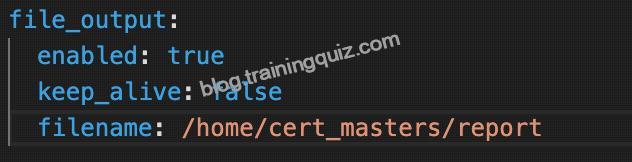
Store an incident file at /home/cert_masters/report, in the following format:
[timestamp],[uid],[processName]
Note: Make sure to store incident file on the cluster’s worker node, don’t move it to master node.

QUESTION 29
SIMULATION
a. Retrieve the content of the existing secret named default-token-xxxxx in the testing namespace.
Store the value of the token in the token.txt
b. Create a new secret named test-db-secret in the DB namespace with the following content:
username: mysql
password: password@123
Create the Pod name test-db-pod of image nginx in the namespace db that can access test-db-secret via a volume at path /etc/mysql-credentials

QUESTION 30
Given an existing Pod named nginx-pod running in the namespace test-system, fetch the service-account-name used and put the content in /candidate/KSC00124.txt Create a new Role named dev-test-role in the namespace test-system, which can perform update operations, on resources of type namespaces.
Create a new RoleBinding named dev-test-role-binding, which binds the newly created Role to the Pod’s ServiceAccount ( found in the Nginx pod running in namespace test-system).

QUESTION 31
Create a new ServiceAccount named backend-sa in the existing namespace default, which has the capability to list the pods inside the namespace default.
Create a new Pod named backend-pod in the namespace default, mount the newly created sa backend-sa to the pod, and Verify that the pod is able to list pods.
Ensure that the Pod is running.

QUESTION 32
You can switch the cluster/configuration context using the following command: [desk@cli] $ kubectl config use-context test-account Task: Enable audit logs in the cluster.
To do so, enable the log backend, and ensure that:
1. logs are stored at /var/log/Kubernetes/logs.txt
2. log files are retained for 5 days
3. at maximum, a number of 10 old audit log files are retained
A basic policy is provided at /etc/Kubernetes/logpolicy/audit-policy.yaml. It only specifies what not to log. Note: The base policy is located on the cluster’s master node.
Edit and extend the basic policy to log: 1. Nodes changes at RequestResponse level 2. The request body of persistentvolumes changes in the namespace frontend 3. ConfigMap and Secret changes in all namespaces at the Metadata level Also, add a catch-all rule to log all other requests at the Metadata level Note: Don’t forget to apply the modified policy.

QUESTION 33
SIMULATION
Secrets stored in the etcd is not secure at rest, you can use the etcdctl command utility to find the secret value for e.g:- ETCDCTL_API=3 etcdctl get /registry/secrets/default/cks-secret –cacert=”ca.crt” –cert=”server.crt” –key=”server.key” Output

Using the Encryption Configuration, Create the manifest, which secures the resource secrets using the provider AES-CBC and identity, to encrypt the secret-data at rest and ensure all secrets are encrypted with the new configuration.


QUESTION 34
Use the kubesec docker images to scan the given YAML manifest, edit and apply the advised changes, and passed with a score of 4 points.
kubesec-test.yaml
apiVersion: v1
kind: Pod
metadata:
name: kubesec-demo
spec:
containers:
– name: kubesec-demo
image: gcr.io/google-samples/node-hello:1.0
securityContext:
readOnlyRootFilesystem: true
Hint: docker run -i kubesec/kubesec:512c5e0 scan /dev/stdin < kubesec-test.yaml

QUESTION 35
Context:
Cluster: gvisor
Master node: master1
Worker node: worker1
You can switch the cluster/configuration context using the following command:
[desk@cli] $ kubectl config use-context gvisor
Context: This cluster has been prepared to support runtime handler, runsc as well as traditional one.
Task:
Create a RuntimeClass named not-trusted using the prepared runtime handler names runsc.
Update all Pods in the namespace server to run on newruntime.

QUESTION 36
You must complete this task on the following cluster/nodes: Cluster: immutable-cluster Master node: master1 Worker node: worker1 You can switch the cluster/configuration context using the following command:
[desk@cli] $ kubectl config use-context immutable-cluster
Context: It is best practice to design containers to be stateless and immutable.
Task:
Inspect Pods running in namespace prod and delete any Pod that is either not stateless or not immutable.
Use the following strict interpretation of stateless and immutable:
1. Pods being able to store data inside containers must be treated as not stateless.
Note: You don’t have to worry whether data is actually stored inside containers or not already.
2. Pods being configured to be privileged in any way must be treated as potentially not stateless or not immutable.

QUESTION 37
Context: Cluster: prod Master node: master1 Worker node: worker1
You can switch the cluster/configuration context using the following command:
[desk@cli] $ kubectl config use-context prod
Task: Analyse and edit the given Dockerfile (based on the ubuntu:18:04 image) /home/cert_masters/Dockerfile fixing two instructions present in the file being prominent security/best-practice issues.
Analyse and edit the given manifest file /home/cert_masters/mydeployment.yaml fixing two fields present in the file being prominent security/best-practice issues.
Note: Don’t add or remove configuration settings; only modify the existing configuration settings, so that two configuration settings each are no longer security/best-practice concerns. Should you need an unprivileged user for any of the tasks, use user nobody with user id 65535

QUESTION 38
use the Trivy to scan the following images,
1. amazonlinux:1
2. k8s.gcr.io/kube-controller-manager:v1.18.6
Look for images with HIGH or CRITICAL severity vulnerabilities and store the output of the same in /opt/trivy-vulnerable.txt


QUESTION 39
You can switch the cluster/configuration context using the following command:
[desk@cli] $ kubectl config use-context prod-account
Context:
A Role bound to a Pod’s ServiceAccount grants overly permissive permissions. Complete the following tasks to reduce the set of permissions.
Task:
Given an existing Pod named web-pod running in the namespace database.
1. Edit the existing Role bound to the Pod’s ServiceAccount test-sa to only allow performing get operations, only on resources of type Pods.
2. Create a new Role named test-role-2 in the namespace database, which only allows performing update operations, only on resources of type statuefulsets.
3. Create a new RoleBinding named test-role-2-bind binding the newly created Role to the Pod’s ServiceAccount.
Note: Don’t delete the existing RoleBinding.

QUESTION 40
You can switch the cluster/configuration context using the following command: [desk@cli] $ kubectl config use-context qa Context: A pod fails to run because of an incorrectly specified ServiceAccount Task: Create a new service account named backend-qa in an existing namespace qa, which must not have access to any secret. Edit the frontend pod yaml to use backend-qa service account Note: You can find the frontend pod yaml at /home/cert_masters/frontend-pod.yaml

QUESTION 41
SIMULATION
Given an existing Pod named test-web-pod running in the namespace test-system Edit the existing Role bound to the Pod’s Service Account named sa-backend to only allow performing get operations on endpoints.
Create a new Role named test-system-role-2 in the namespace test-system, which can perform patch operations, on resources of type statefulsets.
Create a new RoleBinding named test-system-role-2-binding binding the newly created Role to the Pod’s ServiceAccount sa-backend.


QUESTION 42
SIMULATION
Create a RuntimeClass named untrusted using the prepared runtime handler named runsc.
Create a Pods of image alpine:3.13.2 in the Namespace default to run on the gVisor runtime class.
Verify: Exec the pods and run the dmesg, you will see output like this:-


QUESTION 43
Context
The kubeadm-created cluster’s Kubernetes API server was, for testing purposes, temporarily configured to allow unauthenticated and unauthorized access granting the anonymous user duster-admin access.
Task
Reconfigure the cluster’s Kubernetes API server to ensure that only authenticated and authorized REST requests are allowed.
Use authorization mode Node,RBAC and admission controller NodeRestriction.
Cleaning up, remove the ClusterRoleBinding for user system:anonymous.

QUESTION 44
Context
Your organization’s security policy includes:
ServiceAccounts must not automount API credentials
ServiceAccount names must end in “-sa”
The Pod specified in the manifest file /home/candidate/KSCH00301 /pod-m nifest.yaml fails to schedule because of an incorrectly specified ServiceAccount.
Complete the following tasks:
Task
1. Create a new ServiceAccount named frontend-sa in the existing namespace q a. Ensure the ServiceAccount does not automount API credentials.
2. Using the manifest file at /home/candidate/KSCH00301 /pod-manifest.yaml, create the Pod.
3. Finally, clean up any unused ServiceAccounts in namespace qa.


Most Reliable Linux Foundation CKS Training Materials: https://www.trainingquiz.com/CKS-practice-quiz.html

Related Links: myportal.utt.edu.tt myportal.utt.edu.tt myportal.utt.edu.tt myportal.utt.edu.tt www.stes.tyc.edu.tw myportal.utt.edu.tt

Leave a Reply

Please sing in to post your comment or singup if you don't have account.
Enter the text from the image below